Weather Today: Live Radar
- 4.4
- Rating
- 100.00K
- Installs
- Free
- Price
 Analysis by App-foxy
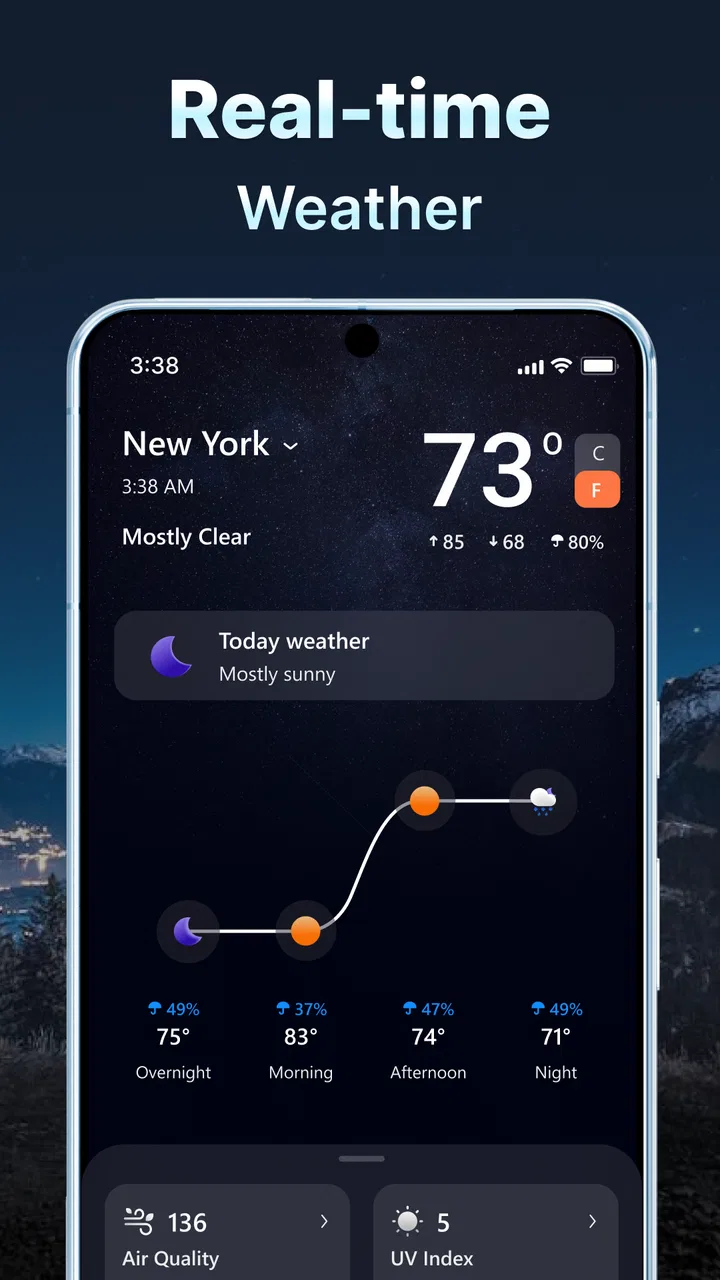
I often check the weather several times before leaving home: once when I wake up, again before commuting, and sometimes one more time when plans change. The annoying part is not opening a forecast; it is deciding whether the information is current enough to trust. Weather Today: Live Radar is built around that everyday problem, combining current weather information with hourly and daily forecast views in one weather app. After spending time with it, I found its main value is simple: it reduces the need to jump between a general weather screen, a radar tool, and a separate forecast page.
The app comes from AMOBEAR TECHNOLOGY GROUP and is aimed at ordinary daily planning rather than specialist meteorology. That distinction matters. I would not treat it as a replacement for official emergency alerts or a professional weather service, but I do find it useful for answering practical questions: Should I take an umbrella? Is a walk likely to be comfortable later? Would it be smarter to run an errand now instead of waiting until the afternoon?
It is a free weather app for everyone, with optional in-app purchases ranging from around one dollar to several hundred dollars per item. The free entry point makes it easy to try without committing first. At the same time, the wide purchase range is something I would examine carefully before tapping any upgrade button, especially if I only need a straightforward forecast.
You May Also Like

 Blood Strike: 2.5 Anniversary
Blood Strike’s Loadouts Turn Every Drop Into a Tactical Gamble
A close look at Blood Strike’s custom loadouts: how fast access to signature weapons reshapes its battle royale rhythm, rewards preparation, and narrows the gap between fights.

 Pandora - Music & Podcasts
Pandora’s Music Is Easy to Start, but Harder to Recover
Pandora’s strength is its low-effort path from a seed to a station. Its weak spot is how much confidence it asks you to place in connection, setup, and quiet recovery.

 8 Ball Pool
 Is Built on Rivalries, Rematches, and Routine
A close look at the rivalries, rematches, shared routines, and unanswered safety questions that turn a quick pool match into a persistent mobile community.

 Samsung Music
’s Quiet Strength Is Playing What You Already Own
Its reach comes less from spectacle than from dependable access to a personal library. That simplicity is both the app’s strongest retention engine and its ceiling.

 AccuWeather: Weather Radar
AccuWeather Review: A Quick, Clear Forecast for Everyday Decisions
For everyday plans, the best forecast is the one you can understand quickly. AccuWeather makes rain timing, radar, and local conditions easy to act on, with a few trade-offs.

 Hill Climb Racing
Why Hill Climb Racing Still Turns Crashes Into One More Run
A tiny car, a bumpy hill and one more upgrade: Hill Climb Racing keeps resurfacing because its simple chaos makes every near-miss feel personal.
More From Our News Desk
View All News


How Weather Today: Live Radar fits into a real day
I find Weather Today: Live Radar most useful when I treat it as a quick planning aid rather than a source of certainty. Checking the forecast around a specific commitment—when I leave, return, or expect to be outdoors—helps turn its different views into a practical decision. That everyday rhythm also makes it easier to see where the app’s convenience ends and when a more specialized weather source is the wiser choice.
The recurring weather-checking problem
Most weather apps promise quick answers, but many become inconvenient when I need more than the current temperature. A simple “what is it like now?” question can turn into several separate checks: the present conditions, the next few hours, the broader outlook, and whether rain is approaching. Weather Today: Live Radar puts those kinds of checks close together, which makes the app more useful than a single static daily summary.
The real benefit is not that I can see more weather information. It is that I can compare time periods without rebuilding the same decision from scratch. If the morning looks fine but the afternoon appears unsettled, the hourly view gives me a reason to adjust my schedule. If the next few hours are stable, I can stop worrying about every small change in the current display.
I especially appreciate this approach when the forecast is borderline. A daily icon may suggest rain, but an hourly view helps me decide whether that means a brief inconvenience during lunch or a reason to change an outdoor plan entirely. Radar adds another layer because it encourages me to look at what is moving toward my area instead of relying only on a broad daily label.
Getting to the first useful forecast
My first recommendation is to set up the app with a specific routine in mind. Do not open it just to browse every available panel. Start by checking the current conditions, then move to the hourly forecast, and use the daily outlook only after you know what decision you are trying to make. This order keeps the screen from becoming a collection of numbers without context.
For a commute, I would look at the time I leave and the time I return rather than focusing on the day’s highest or lowest temperature. For exercise, I would compare the planned start time with the surrounding hours. For errands, I would use the daily forecast to identify the most promising part of the day, then confirm it with the shorter-term view.
The radar view is most helpful when I use it as a confirmation tool. I would not stare at it continuously or assume that every visible patch of precipitation will affect my exact route. Instead, I use it to answer a narrower question: is weather activity moving toward the area I care about, or is the sky likely to remain quiet for the next part of my plan?
This workflow is one of the app’s less obvious strengths. A lot of people open weather apps and read the first large temperature value, then leave. Here, the better experience comes from combining the views in sequence. The app saves time when I use each screen for a different decision rather than treating every forecast element as equally important.
A realistic morning commute
Imagine leaving for work in the morning with a dry-looking sky but a long walk between transport connections. I would first check the current conditions, then scan the hours covering the journey. If rain appears only later, I might leave as planned but pack a light layer. If the hourly pattern looks unsettled during the whole commute, I can change the route or carry better protection before stepping outside.
That small habit is where the app earns its place. It does not remove uncertainty, because weather forecasts can change, but it reduces the number of separate decisions I need to make. I am not trying to predict the atmosphere myself; I am trying to avoid being surprised by a forecast I could have checked in under a minute.
Useful scenarios beyond commuting
Parents can use the hourly view when deciding when to walk children to school, visit a playground, or plan an outdoor afternoon. The daily forecast is useful for choosing which day is more suitable, while the shorter view helps avoid a poor time slot. I would still check the forecast again before leaving if the activity depends heavily on dry conditions.
For travel, the app is more useful during the planning stage than as a complete travel companion. Before heading out, I can compare the expected conditions across the day and decide what to pack. During a trip, radar can help me judge whether a nearby shower is temporary or part of a more persistent pattern. However, I would not rely on it alone for dangerous conditions, mountain travel, boating, or any situation where official warnings are essential.
Gardeners and people caring for outdoor tasks may also find the combination practical. A daily forecast can help choose a general workday, while the hourly view helps decide whether watering, painting, washing a car, or moving furniture outdoors should happen in the morning or later. The key trade-off is that the app helps with timing, not certainty.
Even a simple plan such as meeting a friend for coffee benefits from this structure. I can check the conditions around the meeting rather than reacting to the weather at the moment I happen to open the app. That is a small distinction, but it is exactly how a weather utility saves time: it supports a decision before the problem arrives.
Where it removes friction
The app’s strongest practical quality is consolidation. Current conditions, radar, hourly information, and daily planning belong to the same decision-making chain, so having them together feels more efficient than using separate tools. I spend less time switching between screens or deciding which source to trust for each part of a routine check.
The short description presents it as “Weather Today,” but I think its usefulness goes beyond the immediate moment. The hourly and daily views make it suitable for planning, while radar gives the forecast a more visual dimension. That combination is more helpful than a large temperature display alone, particularly when the weather is changing quickly.
There is also a psychological advantage to checking a time range instead of a single instant. A current reading can look reassuring while the next few hours are inconvenient. Conversely, a gloomy current snapshot may not matter if conditions improve before I need to go out. Looking across the timeline helps me avoid overreacting to one moment.
One practical tip is to check the forecast at two different points for plans that matter. I would look once while arranging the activity and again shortly before leaving. The first check helps with scheduling; the second catches changes. This is not a special feature, but the app’s mix of views makes that two-stage habit quick enough to maintain.
Comparing it with familiar alternatives
Compared with the weather widget or default weather screen on a phone, Weather Today: Live Radar feels more useful when I want to investigate a change rather than glance at a single value. A built-in widget is excellent for speed, but it often encourages a shallow check. This app is better when I need to compare hours, inspect the broader day, or look at radar before making a decision.
Compared with a radar-only app, it is more convenient for general use because I do not have to leave the radar environment to see the rest of the forecast. A dedicated radar service may still be preferable for users who track storms closely or need highly specialized weather information. For ordinary errands, the combined approach is less demanding.
Compared with a general search engine’s weather card, the app offers a more focused experience. Search is convenient when I need a quick answer for a place, but it is not always the best workflow for repeated checks throughout the day. An installed weather tool makes the habit more direct, particularly when I already know the location I want to monitor.
My choice would therefore depend on the type of user. If I only want the current temperature, the phone’s default option may be enough. If I need a professional warning system, a specialist service is a better fit. If I want a practical middle ground with radar, hourly planning, and a daily outlook, this app makes more sense.
What I would watch before relying on it
The first limitation is that more views can also mean more interpretation. Radar, hourly forecasts, and daily summaries are helpful only when I understand that they answer different questions. A user who expects one perfectly certain answer may find the app confusing when the displays appear to disagree. I see that as a normal forecasting trade-off, but it still requires a little judgment.
The second limitation is that radar should not be treated as a guarantee. Weather movement can be uneven, and a visual display may not tell me exactly what will happen at my doorstep. I use it to improve a decision, not to promise a dry walk. For severe weather, I would look for official alerts and local guidance as well.
The optional purchase structure is another point to consider. Because the app is free to start but includes in-app purchases, I would pay attention to the wording and frequency of upgrade prompts. Someone who wants a basic weather check may prefer to remain within the free experience. Someone who values extra convenience may decide that an upgrade is worthwhile, but I would make that decision based on actual daily use rather than curiosity.
The app is also not the right choice for every kind of forecast user. I would skip it if I need detailed historical weather analysis, specialist aviation information, agricultural modeling, or emergency communication. Those needs call for tools designed around technical depth or official alerts. This app is better understood as a daily planning assistant, not a complete meteorological workstation.
Who should try it
I think Weather Today: Live Radar suits people who repeatedly ask whether the next few hours are safe or comfortable for a plan. Commuters, walkers, parents, casual travelers, and anyone arranging outdoor errands can benefit from the combination of time ranges and radar. It is particularly appealing if the default phone forecast feels too limited but a professional weather service feels excessive.
It also makes sense for users who prefer a visual check before leaving. Some people understand a moving weather pattern more easily from radar than from a string of percentages or icons. Others will prefer the hourly timeline because it turns a vague daily forecast into a schedule. The app gives both approaches a place in the same routine.
Its audience is reflected in its broad availability: the app is rated for Everyone and works on Android devices running version seven or later. It has reached over one hundred thousand installs and holds a 4.4 average from around two thousand ratings, which suggests a meaningful group has tried it and generally responded positively. I would still treat those figures as context rather than proof that it will suit every phone or forecasting habit.
My verdict after using the full workflow
Weather Today: Live Radar succeeds because it addresses a repetitive nuisance rather than trying to turn weather checking into an elaborate hobby. I can open it for the current conditions, move to the hours that matter, and use the daily outlook or radar when the decision needs more context. That sequence is quick, understandable, and useful for ordinary plans.
I like it most when the weather is uncertain but not dangerous: a possible shower during a commute, a changing afternoon before a walk, or a weekend plan that needs better timing. In those situations, the app gives me enough context to act without forcing me to consult several different tools.
I am less enthusiastic about using it as the only source for high-risk situations, and I would be cautious about optional purchases until I knew which extras I actually needed. Those are reasonable limits, not deal-breakers. They simply define the app’s proper role.
Released in late May of 2024 and currently at version 1.6.1, it feels like a focused utility for people who want more than a basic temperature glance without entering the world of specialist forecasting. My recommendation is straightforward: try the free version if your main goal is to save time deciding when to go out. If your needs are ordinary daily planning, the combination of radar, hourly information, and daily forecasting makes it a useful addition to a phone. If you need authoritative warnings or technical weather analysis, choose a more specialized alternative instead.
FAQs for Weather Today: Live Radar
01What is Weather Today: Live Radar used for?
Weather Today: Live Radar is designed to provide current conditions, hourly updates, daily forecasts, and radar-based weather information in one place. During testing, it was useful for checking temperature, precipitation, wind, and other details before commuting or planning outdoor activities. The app is intended for everyday weather awareness rather than replacing official emergency alerts or professional meteorological services.
02Does Weather Today: Live Radar provide live radar and accurate forecasts?
The app presents radar imagery and forecast information intended to help users follow approaching rain, storms, and changing conditions. Forecast accuracy can vary depending on location, weather model coverage, and how quickly conditions develop. Radar data may also be delayed slightly, so users should treat it as a helpful guide and verify severe-weather information through local authorities when safety is involved.
03Does the app require location access to work?
Weather Today: Live Radar can generally be used by searching for a city or selecting a location manually, but enabling location access makes the experience more convenient. With permission, the app can show weather for your current area and update it as you move. Users who prefer greater privacy can deny location access and enter places themselves, although some location-based features may be limited.
04Is Weather Today: Live Radar free to download and use?
The application may be available as a free download, but some features can depend on the version offered in your region. Free access may include basic forecasts and weather information, while advertising, premium tools, or subscription options may be present. Before downloading or subscribing, review the app-store listing carefully to confirm pricing, trial conditions, renewal terms, and which features are included.
05Does Weather Today: Live Radar send weather alerts and notifications?
Weather Today: Live Radar may support notifications for forecast changes, rain, storms, or other weather events, depending on the installed version and your device settings. Notifications usually require permission and may need to be enabled within the app as well as in the operating system. Because alerts can vary by region and data availability, keep official local emergency-warning systems enabled for serious threats.
Pros
- Accurate hourly forecasts help with short-term planning.
- Live radar makes it easy to track approaching rain and storms.
- Useful weather alerts can warn you about severe conditions.
- Clean interface presents key weather details at a glance.
- Supports multiple locations for travel and family monitoring.
Cons
- Some advanced radar features may require a subscription.
- Frequent notifications can feel excessive for some users.
- Forecast accuracy may vary by region and local data coverage.
- Ads can distract from the weather information on the free plan.
- The app may use extra battery when location and radar stay active.

Weather Today: Live Radar
Gallery